
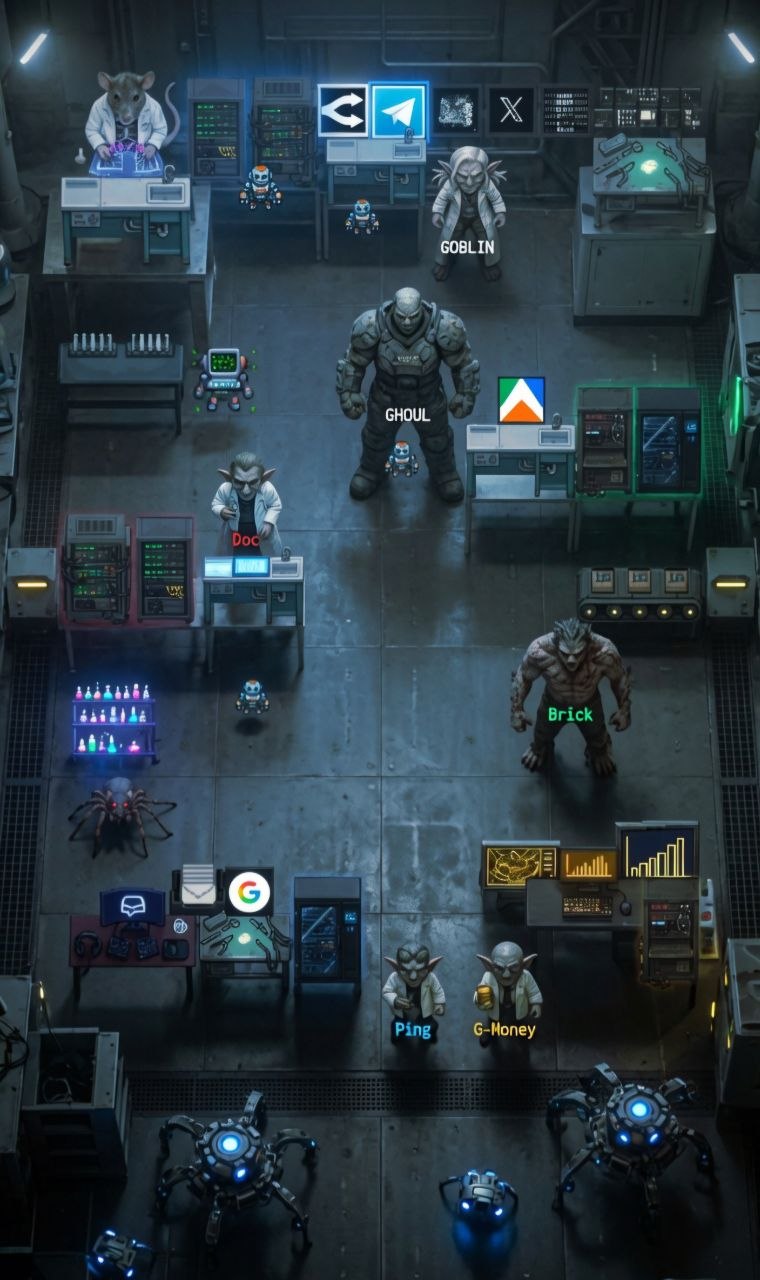
TL;DR: I built a multi-agent AI agent orchestration system (AOS) - six agents across two VPSs, 20+ automated pipelines, and a visual dashboard - all controlled from a single Telegram chat. It costs about $2/day in tokens, runs 24/7, and has fundamentally changed how I build software. Here's how the architecture works, what services it connects to, and how you could build something similar.
What This Is
RatLabs OS isn't an operating system in the traditional sense. There's no kernel, no bootloader, no file system driver. It's an agent orchestration system (AOS) - a layer of autonomous AI agents that sit between me and the machines, services, and platforms I use daily.
The core idea is simple: I talk to one agent, and that agent orchestrates everything else.
I type a message on Telegram. An orchestrator agent interprets my intent, delegates work to specialized sub-agents, they execute across remote machines, and a structured summary comes back. I never SSH into a box, never open a browser dashboard, never context-switch between tools. It all happens through one chat interface.
The architecture is designed around five principles:
- Token budget first - every decision is weighed against cost. No LLM call happens without asking "is this worth it?"
- Always draft, never send - agents propose, humans approve. No autonomous publishing.
- Demand-driven build - nothing gets built unless data proves people want it.
- Structured handoffs - every agent-to-agent transfer is a 2-line summary + a link, not a conversation.
- Self-healing by design - services restart themselves. Humans only hear about actual breaks.
The Architecture (High Level)
Here's the simplified architecture diagram. This is intentionally generic - the pattern applies whether you have one VPS or ten:
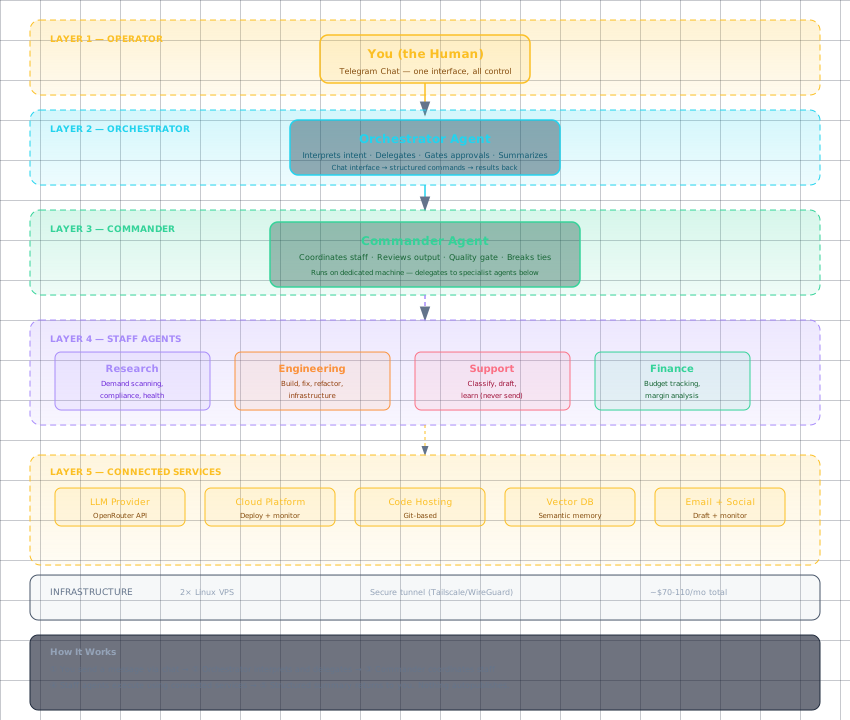
Open the interactive diagram in a new tab for a full view - it shows the layer cake with every component and connection.
The Layer Cake
The system is structured in five layers, and nothing crosses layers without going through the chain of command:
Layer 1: Operator
This is you - the human. Your only interface is a chat application (in my case Telegram). You send a message, get a summary back, and occasionally tap /approve when an agent needs a go-ahead. That's it. No dashboards to check, no terminals to open, no context-switching.
Layer 2: Orchestrator This is your chief of staff agent. It's the only agent that talks to you directly. It interprets your intent, knows which sub-agent handles what, delegates work, collects results, and returns a clean summary. The orchestrator never does floor work - it's purely a router and quality gate.
Layer 3: Commander The working foreman. This agent lives on its own machine (or a separate environment) and manages the day-to-day operations of your domain - builds, research, support, finance. It coordinates the staff below it, reviews their output, and escalates only what needs human attention.
Layer 4: Staff Specialist agents, each with a focused domain:
- A research agent that scans markets and monitors for demand signals
- An engineering agent that builds, fixes, and refactors code
- A support agent that drafts customer replies (never sends them)
- A finance agent that tracks budgets and margins (never moves money)
Layer 5: Connected Services The external tools and platforms the agents interact with - code hosting, cloud platforms, LLM providers, email, vector databases, social media APIs. Agents interact with these through tool APIs, never through direct human access.
The Agents
The system runs six agents total, each with a defined role and a strict chain of command:
| Agent | Role | Domain |
|---|---|---|
| Orchestrator | Chief of Staff | Intent routing, delegation, approvals |
| Commander | Strawboss | Domain operations, quality gate |
| Doc | Researcher | Market scanning, compliance, health |
| Brick | Engineer | Building, fixing, infrastructure |
| Ping | Support | Customer support drafts, network liveness |
| G-Money | Finance | Budget tracking, margin analysis, ROI |
No agent skips levels. The commander doesn't talk to the operator directly. Staff don't talk to the orchestrator. This keeps the chain clear and prevents conflicting instructions.
The Infrastructure
The entire system runs on two virtual private servers (VPSs) - commodity Linux boxes from a hosting provider. Nothing special: standard Ubuntu, no GPU, no exotic hardware. One acts as the command center (orchestrator + gateway), the other as the workshop (commander + build tools).
Key infrastructure choices:
- Secure tunnel between machines (Tailscale or WireGuard) - no open ports to the public internet
- Single LLM provider (OpenRouter) for all agents - one API key, one billing point, model fallback chaining built in
- Local vector database (Qdrant) for semantic memory and knowledge retrieval - no cloud vector service needed
- Git-based everything - code, configs, and content all version-controlled
The cost breakdown is roughly:
| Item | Monthly Cost |
|---|---|
| VPS 1 (orchestrator) | ~$14/mo |
| VPS 2 (commander) | ~$14/mo |
| LLM tokens | ~$50-100/mo (hard guardrails) |
| Domain / misc | ~$2/mo |
| Total | ~$80-130/mo |
There are hard cost guardrails on LLM spend -- every pipeline is designed with its token budget estimated upfront and no_agent scripts preferred wherever possible. The important thing: this is a factory for research AND monetization at the same time. Revenue covers the monthly costs easily.
Services Connected
The agents connect to several external services through API wrappers and CLI tools:
LLM Provider (OpenRouter) - Single point of access to dozens of models. The orchestrator uses a cost-efficient Flash model for 90% of work, falls back to stronger models for complex reasoning or code generation. Model fallback is automatic - if one provider is down, the next one fires.
Cloud Platform (Apify) - Where the built actors are deployed and published. Agents interact through the REST API and CLI for run management, pricing, and monitoring. The Apify Community is also actively monitored as a market research source - keeping an eye on what builders are asking for and what gaps exist in the store.
Code Hosting (GitHub) - All repositories, version control, and CI/CD. Agents create branches, open PRs, request reviews, and merge through the API.
Email + Docs (Google Workspace) - Draft-only access for email. The support agent reads incoming emails (forwarded by a filter), classifies them, researches past interactions, and drafts replies. Drive and Docs are used when needed for report storage and collaborative documents. Human reviews and sends.
Vector Database (Qdrant) - Runs locally in Docker. Stores embedded knowledge: documentation, past customer interactions, market intelligence. Agents query it for context without needing live API calls.
Social Platform (X/Twitter) - The API is used to pull data for market research - tracking what people are talking about, what problems they need solved, and emerging trends in the space. Also used for scheduled product announcements and community engagement.
The Pipelines
The system runs on a schedule of automated pipelines. Each is a cron-triggered script or agent session:
Factory Build Pipeline (daily): Research agent scans for market demand → spec is drafted → human approves → engineering agent builds → 4-check QA gate runs → human approves deploy → manual publish.
Market Intel Pipeline (daily): Two data-collection scripts feed into an agent session that synthesizes findings and stores them in the vector database for future reference.
Support Pipeline (every 2 hours): Email inbox is scanned → new messages are classified → existing knowledge is checked → draft is written → response is learned for future deduplication. Never auto-sends.
Health Pipeline (every 30 minutes): Four critical services are checked. If something needs restarting, it restarts. If everything is healthy, it stays silent. Zero LLM tokens burned.
Diary Pipeline (every 2 days): Each agent writes a short note at the end of its sessions - ideas, observations, craft notes. These are compiled and sent as a digest. No status reports, just signal.
Design Philosophy in Practice
Token budget is a hard constraint. Every pipeline was designed with its token cost estimated upfront. no_agent scripts (shell/Python scripts that run without an LLM) are preferred over agent sessions wherever possible. A pipeline that checks service health doesn't need an LLM - it needs a curl and an exit code.
Agents propose, humans dispose. Customer support drafts are always wrapped in [SUPPORT DRAFT - review before sending]. Builds require /approve before code is written. Pricing changes require sign-off before the monthly lockout window. Nothing happens without a human gate.
Everything is a skill. Each agent's knowledge is packaged as a reusable skill - a markdown file with trigger conditions, exact commands, tool restrictions, and output format. Skills are version-controlled, composable, and loadable on demand. This means agents don't need lengthy prompts - they load the relevant skill and follow the playbook.
How to Scale This
The architecture is designed to scale horizontally. Adding a new domain (e.g., a data analytics pipeline, a social media management system, a monitoring stack) follows the same pattern:
- Provision a new VPS
- Install the agent framework on it
- Generate an SSH key pair and add the public key to the new machine
- Create a skill defining the new agent's domain
- Register it in the routing table
- Assign it a place in the chain of command
The commander started as a single-purpose VPS for one domain. Now it manages four staff agents and multiple pipelines. Each new machine follows the same pattern: isolated, single-purpose, key-gated, with a pinned skill defining its domain.
What This Changes
Before this architecture, my workflow was: have an idea → open laptop → find the right tool → context-switch between 6 different tabs → write code → deploy → repeat. Every. Single. Time.
Now it's: have an idea → pull out phone → type it → get results.
The laptop is still there for when I need to dive deep. But for the 80% of work that doesn't need deep focus, I'm not chained to a desk anymore. I've run full actor builds from the grocery store. I've reviewed customer support drafts while walking the dog. I've approved production deployments from bed.
The fundamental shift is this: I stopped being the operator of individual tools and became the manager of an autonomous system. The agents don't replace me - they handle the floor work so I can focus on the decisions that actually matter.
Resources
Agent Framework:
- Hermes Agent by Nous Research - The agent framework that powers this entire system. Open-source, skill-based, Telegram-native.
Infrastructure:
- Hetzner - Affordable VPS hosting, used for both machines
- Tailscale - Zero-config VPN for secure machine-to-machine communication
Services Referenced:
- OpenRouter - Unified LLM API with model fallback
- Apify - Web scraping and automation platform
- Apify Community - Market research source for builder demand signals
- Qdrant - Vector database, runs locally via Docker
- Google Workspace - Email, Drive, and Docs access
- GitHub - Code hosting and CI/CD
- X/Twitter - Market research data and community engagement
Related Posts: